
Kinnect Design System
Overview
Rebuilt Kinnect’s design system in 17 days, with Claude Code doing the production under written rules, so every screen can prove it is on-system.
Categories
AI Workflow
Design System
Date
Oct 2026
Client
The Kinnect Company
Kinnect is a wealth platform where families and their advisors see accounts, documents and tasks in one place. Its design library had drifted so far from the product that most screens were built from copies of copies. I audited it, rebuilt it from tokens up, and set up a workflow where Claude Code does the production work under written rules. Every sprint screen is now built from the library, and every token matches a name in the code.
Role: Lead product designer, design system owner
Tools: Figma, Claude Code, Figma MCP, GitHub
Scope: Tokens, components, docs, QA, workflow
Outcome: Published library v0.1 to v0.13.1 in 17 days

At a Glance
One lead designer, one AI teammate, and a library the whole team builds with.
In seventeen days the library went from an audit to a published system with 13 minor versions. Each version came with a changelog row, a refreshed registry and a QA pass.

The Challenge
The old library looked complete. The sprint files said otherwise.
On the surface, Kinnect had a design library: hundreds of components and a page of colours. But screens kept drifting from the live app, and nobody could say why. So before designing anything, I measured. A read-only audit of the old library and two recent sprint files covered about 160,000 layers.

The real problem was not missing components. The system had no rules and no way to prove anything, so drift was the default. Adding AI would only have made it drift faster.
What I set out to build
Systematic: every color, space, radius and type setting is a token, named the way developers will name it in CSS.
Governed: written rules that both designers and Claude follow.
Provable: read-only scripts that prove a file is clean, instead of anyone having to trust it.
Shared: one repository that every designer pulls from.
Before and after
The before: a library that looked finished but could not be trusted
These come straight from the old Kin Design Library. The colour guide lists hex values with no tokens behind them, so every screen copied colours by hand. Components kept default names such as Component 29, with variants called Property 1=Frame 1000002450, and none of their 75 colour fills was bound to a variable.

Top: the old colour guide, where every colour is a raw hex value with nothing to bind to. Bottom: the same colours as semantic tokens, each with its role, its CSS variable and its value.
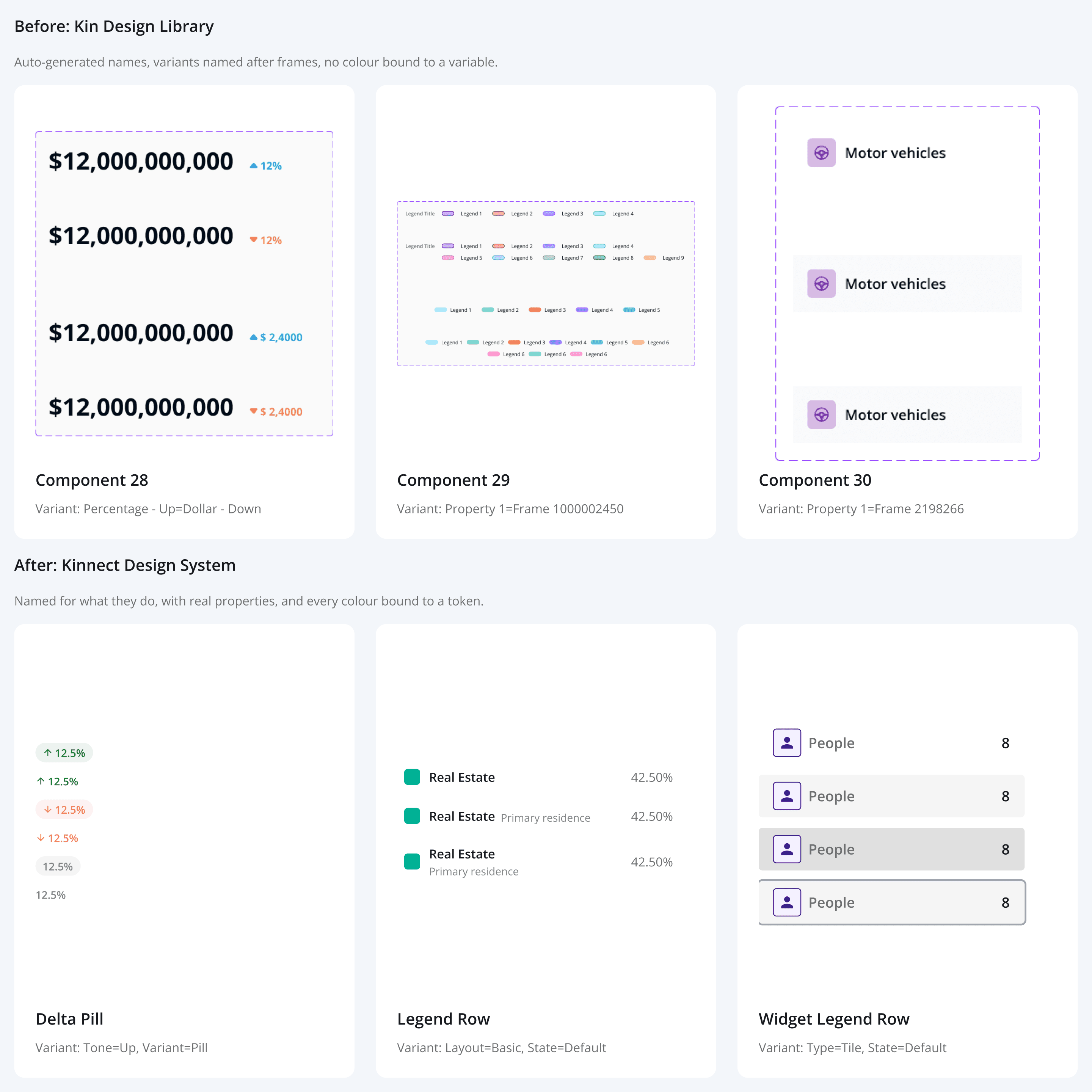
Top: three unnamed Kin component sets, with variants named after auto-generated frames. Bottom: the components that replaced them, named for what they do, with real properties and every colour bound to a token.
Colors: raw hex values in a style guide, now 142 primitives feeding 155 semantic tokens with CSS names.
Names: Component 29 and Property 1=Frame 1000002450, now Title Case sets with Type, Size and State properties.
Icons: three mixed families, now 145 icons named after Material glyphs and swapped by a property.
Proof: none, now a check that scans any sprint file and a library QA run before every publish.
Process
From an audit to a published library, one checked step at a time.
I made every design decision. Claude Code did the production work through the Figma MCP. Nothing was published until I had read the change list.

The Engine
Rules in a repository, hands in Figma.
The key choice was to treat the AI as a teammate that follows a process, not as a tool that produces pixels. Claude Code runs on a folder of instruction files. CLAUDE.md loads the rules automatically. A registry tells Claude which component to use for what, including the words people actually use, such as the yellow notes or the dark nav. The Figma MCP gives it hands in the file.
My job moved from drawing to reviewing as our stakeholders intended for the team workflow. I approve plans, not pixels.

Four guardrails keep it honest.

Team Workflow
Designers, the library and the code pull the same truth.
A design system lasts only if the team keeps using it. Figma holds the designs. GitHub holds the rules, the registry and the checks. Every designer works in Claude Code on a clone of the same repository, so one pull brings a published change to the whole team.

Screen sessions: designers build sprint screens only from library components. Each requirement becomes a yellow note beside the frame, as in our sprint files.
Library sessions: something new goes through plan, OK, build, document and QA, and then a person publishes it.
Exceptions from code: if something already exists in the live app, the engineering lead rebuilds it from the code’s real values. When the app and the library disagree, the code wins.
Key Features
Built for a real product, not a sticker sheet.
Three token tiers: 142 primitives feed 155 semantic colours, and the components use only the semantic ones. A brand change happens in one place.

Two themes, one set of components: family accounts get a light navigation rail and professional accounts a dark one. It is one variable mode switch, not a second copy of the components.

Requirements on the canvas: product requirements sit beside the screen as library notes, one requirement per note, so design and intent travel together.
Designed ahead of code: new design can land before developers build it. A status line on each component says whether to match the code or build from the design.
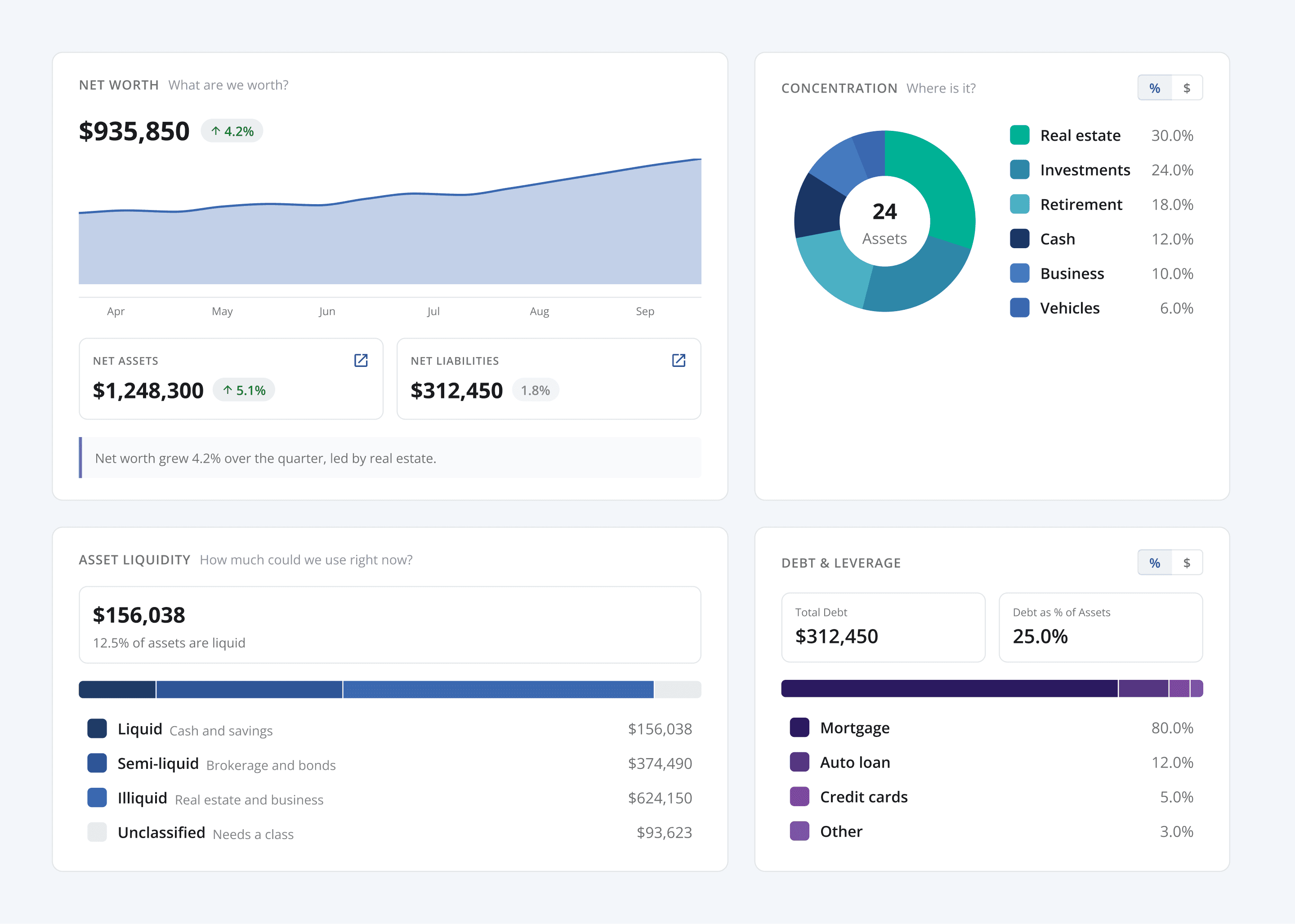
Charts from the real app: donut, line and distribution charts, summary panels and home widgets were rebuilt from the web app’s own values.
Component Gallery
A closer look at the components.
Every image here is built from library instances with placeholder data, not drawn as a mock-up. Change a token in the library and every one of them changes with it.
Six button types across four states, plus icon and AI buttons: one set with Type, Size and State instead of 141 tangled variants.

Text fields, search, selects, a date range and selection controls, each with its focus, error and disabled states.

The net worth summary, rebuilt from the web app’s own chart values: donut, distribution bars and summary tiles.
A task board: header, status summary and task groups, built from table cells that share one set of tokens.

The AI assistant: messages, suggestion chips, attachments, the composer and the processing bar.

Feedback in every tone: alerts, toasts and confirmation dialogs share the same status colors.

Impact
Hours of production became minutes of review.
Claude Code took on the repetitive production: creating and binding tokens, building 88 component sets with their documentation, running QA, and keeping the repository in sync after every publish. My time went to the decisions that shape the product.
The bigger change was cultural. A screen file can now prove it is on-system. Developers can see exactly what to build, and the library no longer drifts quietly away from the app.
I estimate this cut production time by at least 60 percent. On screens, a first draft of a 20-screen feature now takes one to two days instead of half a week.
What I Owned | What Claude Code Automated |
|---|---|
|
|
What I learned
AI amplifies whatever system it is given. Without rules it multiplies drift. With rules it multiplies consistency.
Measure before you design. The audit changed the plan: the problem was governance, not missing components.
Proof beats trust. A script that says clean: true ended review debates faster than anyone’s opinion.
What's next
Code Connect for the components developers have built, CSS variables in the app for the new tokens, fixing the remaining contrast pairs that come from the app’s own colors with engineering, and bringing the last old patterns across sprint by sprint.
Kinnect Design System
Overview
Rebuilt Kinnect’s design system in 17 days, with Claude Code doing the production under written rules, so every screen can prove it is on-system.
Categories
AI Workflow
Design System
Date
Oct 2026
Client
The Kinnect Company
Kinnect is a wealth platform where families and their advisors see accounts, documents and tasks in one place. Its design library had drifted so far from the product that most screens were built from copies of copies. I audited it, rebuilt it from tokens up, and set up a workflow where Claude Code does the production work under written rules. Every sprint screen is now built from the library, and every token matches a name in the code.
Role: Lead product designer, design system owner
Tools: Figma, Claude Code, Figma MCP, GitHub
Scope: Tokens, components, docs, QA, workflow
Outcome: Published library v0.1 to v0.13.1 in 17 days
At a Glance
One lead designer, one AI teammate, and a library the whole team builds with.
In seventeen days the library went from an audit to a published system with 13 minor versions. Each version came with a changelog row, a refreshed registry and a QA pass.
The Challenge
The old library looked complete. The sprint files said otherwise.
On the surface, Kinnect had a design library: hundreds of components and a page of colours. But screens kept drifting from the live app, and nobody could say why. So before designing anything, I measured. A read-only audit of the old library and two recent sprint files covered about 160,000 layers.
The real problem was not missing components. The system had no rules and no way to prove anything, so drift was the default. Adding AI would only have made it drift faster.
What I set out to build
Systematic: every color, space, radius and type setting is a token, named the way developers will name it in CSS.
Governed: written rules that both designers and Claude follow.
Provable: read-only scripts that prove a file is clean, instead of anyone having to trust it.
Shared: one repository that every designer pulls from.
Before and after
The before: a library that looked finished but could not be trusted
These come straight from the old Kin Design Library. The colour guide lists hex values with no tokens behind them, so every screen copied colours by hand. Components kept default names such as Component 29, with variants called Property 1=Frame 1000002450, and none of their 75 colour fills was bound to a variable.
Top: the old colour guide, where every colour is a raw hex value with nothing to bind to. Bottom: the same colours as semantic tokens, each with its role, its CSS variable and its value.
Top: three unnamed Kin component sets, with variants named after auto-generated frames. Bottom: the components that replaced them, named for what they do, with real properties and every colour bound to a token.
Colors: raw hex values in a style guide, now 142 primitives feeding 155 semantic tokens with CSS names.
Names: Component 29 and Property 1=Frame 1000002450, now Title Case sets with Type, Size and State properties.
Icons: three mixed families, now 145 icons named after Material glyphs and swapped by a property.
Proof: none, now a check that scans any sprint file and a library QA run before every publish.
Process
From an audit to a published library, one checked step at a time.
I made every design decision. Claude Code did the production work through the Figma MCP. Nothing was published until I had read the change list.
The Engine
Rules in a repository, hands in Figma.
The key choice was to treat the AI as a teammate that follows a process, not as a tool that produces pixels. Claude Code runs on a folder of instruction files. CLAUDE.md loads the rules automatically. A registry tells Claude which component to use for what, including the words people actually use, such as the yellow notes or the dark nav. The Figma MCP gives it hands in the file.
My job moved from drawing to reviewing as our stakeholders intended for the team workflow. I approve plans, not pixels.
Four guardrails keep it honest.
Team Workflow
Designers, the library and the code pull the same truth.
A design system lasts only if the team keeps using it. Figma holds the designs. GitHub holds the rules, the registry and the checks. Every designer works in Claude Code on a clone of the same repository, so one pull brings a published change to the whole team.
Screen sessions: designers build sprint screens only from library components. Each requirement becomes a yellow note beside the frame, as in our sprint files.
Library sessions: something new goes through plan, OK, build, document and QA, and then a person publishes it.
Exceptions from code: if something already exists in the live app, the engineering lead rebuilds it from the code’s real values. When the app and the library disagree, the code wins.
Key Features
Built for a real product, not a sticker sheet.
Three token tiers: 142 primitives feed 155 semantic colours, and the components use only the semantic ones. A brand change happens in one place.
Two themes, one set of components: family accounts get a light navigation rail and professional accounts a dark one. It is one variable mode switch, not a second copy of the components.
Requirements on the canvas: product requirements sit beside the screen as library notes, one requirement per note, so design and intent travel together.
Designed ahead of code: new design can land before developers build it. A status line on each component says whether to match the code or build from the design.
Charts from the real app: donut, line and distribution charts, summary panels and home widgets were rebuilt from the web app’s own values.
Component Gallery
A closer look at the components.
Every image here is built from library instances with placeholder data, not drawn as a mock-up. Change a token in the library and every one of them changes with it.
Six button types across four states, plus icon and AI buttons: one set with Type, Size and State instead of 141 tangled variants.
Text fields, search, selects, a date range and selection controls, each with its focus, error and disabled states.
The net worth summary, rebuilt from the web app’s own chart values: donut, distribution bars and summary tiles.
A task board: header, status summary and task groups, built from table cells that share one set of tokens.
The AI assistant: messages, suggestion chips, attachments, the composer and the processing bar.
Feedback in every tone: alerts, toasts and confirmation dialogs share the same status colors.
Impact
Hours of production became minutes of review.
Claude Code took on the repetitive production: creating and binding tokens, building 88 component sets with their documentation, running QA, and keeping the repository in sync after every publish. My time went to the decisions that shape the product.
The bigger change was cultural. A screen file can now prove it is on-system. Developers can see exactly what to build, and the library no longer drifts quietly away from the app.
I estimate this cut production time by at least 60 percent. On screens, a first draft of a 20-screen feature now takes one to two days instead of half a week.
What I Owned | What Claude Code Automated |
|---|---|
|
|
What I learned
AI amplifies whatever system it is given. Without rules it multiplies drift. With rules it multiplies consistency.
Measure before you design. The audit changed the plan: the problem was governance, not missing components.
Proof beats trust. A script that says clean: true ended review debates faster than anyone’s opinion.
What's next
Code Connect for the components developers have built, CSS variables in the app for the new tokens, fixing the remaining contrast pairs that come from the app’s own colors with engineering, and bringing the last old patterns across sprint by sprint.




© 2025 Prateek Singhal
© 2025 Prateek Singhal
© 2025 Prateek Singhal